Web Development
Next.js vs React: When You Need a Framework
React is a library, Next.js is a framework built on it. A pragmatic, dated guide to which one fits your project, SPA, SEO site, or full-stack app.
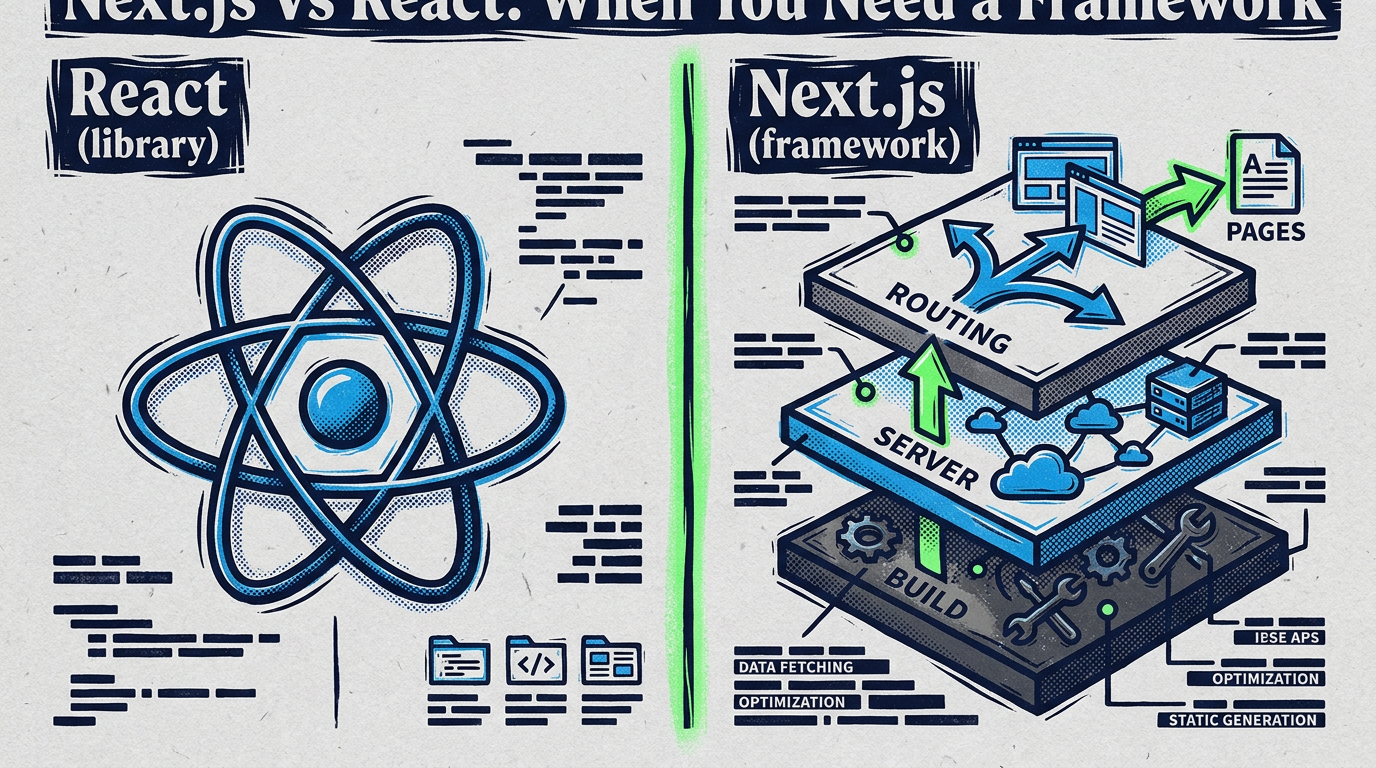
React is a library for building user interfaces. Next.js is a framework built on top of React. So “Next.js vs React” is a bit of a trick question, you’re not choosing between two competitors, you’re choosing whether plain React is enough or whether you want the routing, rendering, and build machinery Next.js wraps around it. Everything below sorts out which side of that line your project sits on.
The frameworks here move fast. This reflects the landscape as of May 2026, with the App Router as the current Next.js default. Before you lock in an architecture, check the official React docs and official Next.js docs for the current state, release cadence on the Next.js side especially is brisk, and details shift between major versions.
What React actually is
React is a JavaScript library focused on one job: rendering UI from state. You describe components, React keeps the DOM in sync when state changes. That’s the core. It does not have an opinion about routing, data fetching, server rendering, or how you bundle your code.
That narrow focus is a feature, not a gap. React stays small and composable because it leaves the surrounding decisions to you. The cost is that you assemble the rest of the stack yourself.
function Counter() {
  const [count, setCount] = useState(0);
  return <button onClick={() => setCount(count + 1)}>{count}</button>;
}
That snippet runs the same whether you ship it in a plain Vite app or inside Next.js. The component model is identical. What differs is everything around the component, and that’s the part Next.js takes over.
To run React on its own today, most people reach for a build tool like Vite. You get a fast dev server, a production bundler, and a blank canvas. You then pick a router (React Router is common), decide how you fetch data, and ship a single-page app where the browser does the rendering. That setup is genuinely good for a large class of apps. It’s just not the whole stack.
What Next.js adds on top
Next.js takes React and bolts on the decisions React deliberately left open. Think of it as a batteries-included assembly of React plus a router, a rendering engine, a build pipeline, and a server. Here’s what you’re actually getting:
- File-system routing. Drop a file in the right folder and it becomes a route. No manual router config for the common case.
- Multiple rendering modes. Server-side rendering (SSR), static site generation (SSG), and incremental static regeneration (ISR), render at request time, at build time, or revalidate on a schedule. Plain React gives you client rendering only unless you wire up SSR yourself.
- React Server Components. Components that run on the server, never ship their JavaScript to the browser, and can talk to your database directly. This is the headline shift of the App Router era.
- API routes. Backend endpoints living in the same project as your frontend. You can build a full-stack app without a separate server repo.
- Image and font optimization. Built-in components that resize, lazy-load, and serve images in modern formats, plus font loading that avoids layout shift.
- Bundling and code-splitting. Per-route splitting out of the box, so a visitor downloads only the code for the page they’re on.
None of this is magic React couldn’t theoretically do, it’s that someone has done the wiring and made opinionated defaults. The same way a clean module structure saves you from re-litigating boundaries on every feature, a framework saves you from re-deciding routing and rendering on every project. The tradeoff is that you live inside its conventions.
Lab Notes, a framework is a set of decisions, made early. Next.js isn’t “more React.” It’s React with the open questions pre-answered. That’s a gift when its answers match your needs and a tax when they don’t.
When plain React (or Vite) is enough
Reaching for Next.js by default is a common reflex, and it’s often the wrong one. Plenty of projects are better served by plain React on Vite. Here’s where I’d skip the framework:
- A pure single-page app behind a login. A dashboard, an admin panel, an internal tool, the content sits behind auth, search engines never see it, and SEO is irrelevant. You don’t need server rendering for a page Google can’t index anyway.
- An embedded widget or component. A chat box, a checkout widget, a comment system you drop into someone else’s page. You want a small bundle and zero framework assumptions, not a routing layer.
- Learning React. When you’re learning the library, Next.js adds concepts, server components, the rendering modes, the App Router, that obscure what React itself is doing. Start on Vite. Learn the component model first. Add the framework once the fundamentals are solid.
- A small, mostly-static app where you already control the server. If you have a backend and just need a UI bolted on, a Vite SPA served as static files is hard to beat for simplicity.
The signal is roughly: if SEO doesn’t matter and you don’t need server-rendered HTML, you probably don’t need Next.js. Plain React keeps your mental model small and your build simple.
When does Next.js actually win?
Next.js earns its complexity when the things it provides are things you genuinely need. That’s most often when content has to be visible to crawlers, or when you want frontend and backend in one place.
- SEO-critical sites. Marketing sites, blogs, documentation, landing pages, anywhere Google ranking matters. Server-rendered or static HTML means crawlers see real content on first load instead of an empty
<div>waiting for JavaScript. A client-only React SPA can be indexed, but it’s a fight you don’t need to pick. - Content sites that benefit from SSG/ISR. A blog with hundreds of posts can be statically generated at build time and revalidated incrementally as content changes. Fast, cheap to serve, and crawler-friendly.
- Full-stack apps. When you want API routes, server-side data fetching, and server components talking to your database all in one repo, Next.js is built for it. You skip the separate-backend ceremony for a lot of apps.
- E-commerce. Product pages need to rank and load fast, while cart and checkout need interactivity and server logic. Next.js handles the static-meets-dynamic split well, exactly the case its rendering modes were designed for.
The pattern: Next.js wins when you need HTML rendered before JavaScript runs, when you want the backend and frontend co-located, or both.
The App Router vs the Pages Router
If you read older tutorials, you’ll hit two different ways to structure a Next.js app, and it’s a real source of confusion. Worth naming clearly.
The Pages Router is the original model: routes live in a pages/ directory, data fetching uses functions like getServerSideProps and getStaticProps. It’s mature, widely documented, and still supported.
The App Router is the newer model, built around React Server Components, living in an app/ directory with a different data-fetching and layout system. As of 2026, the App Router is the current default for new Next.js projects, and it’s where active development is focused.
Both still work. If you’re starting fresh, the App Router is the path the framework is steering you toward. If you’re maintaining an existing Pages Router app, there’s no fire, but new feature work increasingly assumes the App Router model. This split is exactly the kind of detail that changes between versions, so confirm the current recommendation in the Next.js docs before committing. Mark anything you read about the routers with a date; tutorials from a year ago may describe a different default.
Deployment considerations
This is where the library-versus-framework distinction gets concrete. A plain React SPA built with Vite produces static files, HTML, CSS, JS, that you can drop on any static host or CDN. Cheap, simple, portable. No server process to run.
Next.js is different depending on how you use it. A fully static export (all SSG, no server features) can also be hosted as static files. But the moment you use SSR, ISR, API routes, or server components that run at request time, you need a runtime environment that can execute server code. That means a Node.js server or a platform built to run Next.js. It deploys most seamlessly on Vercel (the company behind Next.js), but self-hosting and other platforms are supported, just expect more setup than dropping static files in a bucket.
The practical takeaway: a Vite SPA is the lower-operations choice. Next.js with server features buys you capability at the cost of needing somewhere that can run server code. Factor that into the decision, because it shapes hosting cost and complexity for the life of the project.
The learning-curve tradeoff
There’s an honest cost to Next.js that the marketing tends to skip: more concepts. With plain React you learn components, state, props, hooks. That’s a contained mental model. With Next.js you also learn file-system routing, the rendering modes and when each applies, the App Router’s server-versus-client component boundary, caching behavior, and the deployment model. Each is learnable, but together they’re a real ramp.
That ramp is worth it when you need what’s at the top. It’s pure overhead when you don’t. This is the same calculus that shows up across the stack, the same way picking a persistence layer means weighing capability against the ceremony it adds. Don’t pay the framework tax for features you won’t use; don’t reinvent the framework’s wiring by hand when you’d just be rebuilding Next.js badly.
So which should you choose?
There’s no winner here, because they’re not in the same category. There’s only fit. Use this as a decision guide, not a leaderboard.
Choose plain React (on Vite) when:
- You’re building a single-page app behind auth where SEO doesn’t matter.
- You’re shipping an embedded widget that needs a small footprint.
- You’re learning React and want the fundamentals without framework concepts on top.
- You want the simplest possible static deployment and already have a backend.
Choose Next.js when:
- SEO matters, marketing sites, blogs, docs, landing pages.
- You’re building a content site that benefits from SSG or ISR.
- You want a full-stack app with API routes and server-side data in one repo.
- You’re building e-commerce where pages must rank and be interactive.
You’re already using both, in a sense, when you pick Next.js, because Next.js is React, plus the surrounding machinery. The real question is never “React or Next.js.” It’s “do I need the framework’s decisions, or do I want to make them myself?” Answer that honestly and the choice makes itself.
A short checklist before you commit
- Decide whether server-rendered HTML matters for your app. If no, plain React is likely enough.
- Confirm whether you need a co-located backend (API routes, server components) or already have one.
- Check the current default router and rendering recommendations in the official Next.js docs, this changes between versions.
- Factor in deployment: static files are cheaper and simpler than a server runtime.
- If you’re learning, start on Vite. Add Next.js once the React fundamentals are solid.
- Re-verify version-sensitive details (App Router, RSC, Turbopack) against current docs before building.
Related reading
- Claude Code vs Cursor: Choosing Your AI Coding Tool, picking the right tool by workflow fit, the same logic applied to AI coding assistants.
- Kotlin Project Structure for Beginners, clean boundaries that make any framework decision easier to live with.
- Modern Android Persistence Options, another capability-versus-ceremony architecture call.
Sources
- “React”, Meta Open Source, official React documentation; defines React as a UI library and its component model.
- “Next.js Documentation”, Vercel, official Next.js documentation; covers routing, rendering modes, server components, and the current default App Router.